
Streaming LLM tokens to browsers with ASP.NET Core 10 SSE results
An LLM answer that takes several seconds to generate feels broken if the user watches a spinner the whole time. Streaming fixes that, and in ASP.NET Core 10 you no longer need SignalR or a hand-written text/event-stream writer to do it. TypedResults.ServerSentEvents plus IChatClient.GetStreamingResponseAsync from Microsoft.Extensions.AI streams LLM tokens to the browser over plain HTTP, and when the browser goes away, the model call is cancelled too.
This tutorial builds that endpoint, a 33-line HTML client, and an offline stub model so everything runs without an API key. It covers cancellation, the EventSource reconnect behavior that can bill you for the same answer twice, and proxy buffering. It doesn’t cover authentication, chat history, or tool calling.
What you need
- .NET SDK 10.0.402 (runtime 10.0.13). The
global.jsonin the sample pins the SDK. - Microsoft.Extensions.AI 10.11.0, which pulls in Microsoft.Extensions.AI.Abstractions 10.11.0.
curl, and any current browser. I checked the client in headless Chrome 155.
Download the full sample as aspnet-core-sse-llm-streaming-sample.zip. It unzips to a sample/ folder, and ./demo.sh inside it starts the server and reproduces every terminal output below.
What is Server-Sent Events?
Server-Sent Events (SSE) is a WHATWG HTML standard for one-way server-to-browser messages over a single long-lived HTTP response. The response has the text/event-stream content type and contains blocks of field: value lines (event, data, id, retry), with a blank line between events. Browsers consume it with the built-in EventSource API.
LLM output fits SSE well. The client sends one prompt, and the server pushes many small pieces back. You don’t need the bidirectional channel of WebSockets. SignalR falls back to SSE itself when WebSockets aren’t available.
How the pieces fit
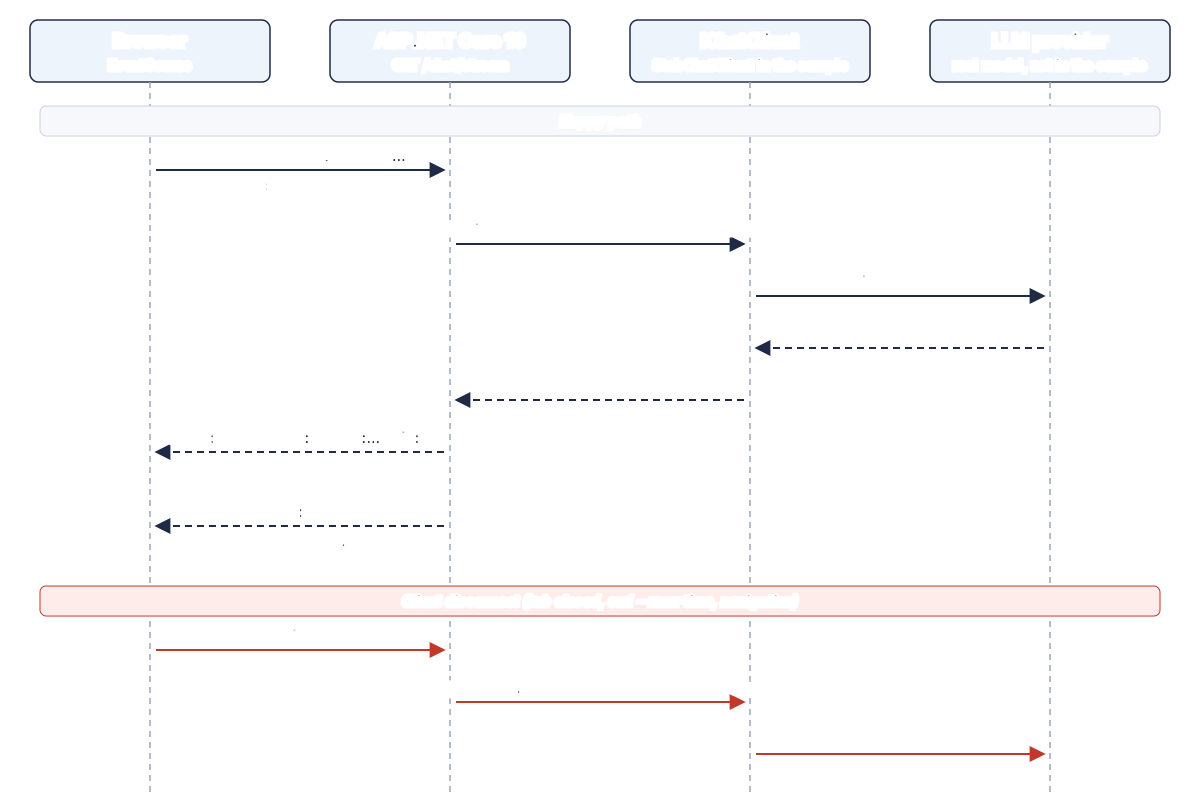
Request flow for the sample. In the sample, StubChatClient stands in for both the client library and the provider.
Two contracts carry the whole design:
IChatClientis the provider-agnostic abstraction in Microsoft.Extensions.AI. Per the IChatClient docs,GetStreamingResponseAsyncreturns anIAsyncEnumerable<ChatResponseUpdate>: a stream of updates that together make up one response.TypedResults.ServerSentEventsis new in ASP.NET Core 10. It takes anIAsyncEnumerable<T>and writes each item as an SSE event. In .NET, an event is represented bySseItem<T>, which carriesData,EventType,EventId, andReconnectionInterval.
The endpoint’s only job is to turn one async stream into the other.
Step 1: a deterministic stub IChatClient
A stub model keeps tests free and output stable. The stub below emits a canned sentence one word at a time, with a fixed delay per token, and it honors the cancellation token the same way a real HTTP-based client would:
using System.Runtime.CompilerServices;
using Microsoft.Extensions.AI;

// Deterministic stand-in for a real model: no network, no API key, same output every run.
public sealed class StubChatClient(TimeSpan tokenDelay) : IChatClient
{
    // ... GetResponseAsync collects the stream with ToChatResponse()

    public async IAsyncEnumerable<ChatResponseUpdate> GetStreamingResponseAsync(
        IEnumerable<ChatMessage> messages,
        ChatOptions? options = null,
        [EnumeratorCancellation] CancellationToken cancellationToken = default)
    {
        var prompt = messages.LastOrDefault(m => m.Role == ChatRole.User)?.Text ?? "";
        var answer = $"You asked: \"{prompt}\". Server-Sent Events stream one token at a time.";

        // Split on spaces but keep the leading space, the way real tokenizers emit " word".
        var tokens = answer.Split(' ').Select((w, i) => i == 0 ? w : " " + w);
        foreach (var token in tokens)
        {
            // Passing the token on is what lets a closed browser tab stop the "model".
            await Task.Delay(tokenDelay, cancellationToken);
            yield return new ChatResponseUpdate(ChatRole.Assistant, token);
        }
    }

    // ... GetService and Dispose
}
[EnumeratorCancellation] lets the token reach the iterator body whether the caller passes it as an argument or attaches it later with WithCancellation(). Without the attribute, a token supplied through WithCancellation() is ignored, and the stub keeps “generating” after the client has left.
Step 2: the SSE endpoint
Register the stub as the app’s IChatClient with AddChatClient, the same dependency injection extension you’d use for a real provider:
using System.ComponentModel.DataAnnotations;
using System.Net.ServerSentEvents;
using System.Runtime.CompilerServices;
using Microsoft.Extensions.AI;

var builder = WebApplication.CreateBuilder(args);

builder.Services.AddValidation();
// Swap the stub for any provider that implements IChatClient; the endpoint doesn't change.
builder.Services.AddChatClient(new StubChatClient(TimeSpan.FromMilliseconds(150)));

var app = builder.Build();
app.UseDefaultFiles();
app.UseStaticFiles();

app.MapGet("/chat/stream", (
    [Required, StringLength(500)] string prompt,
    IChatClient chat,
    HttpContext http,
    ILogger<Program> logger) =>
{
    // Kestrel already writes each event immediately; this asks nginx not to buffer either.
    http.Response.Headers["X-Accel-Buffering"] = "no";
    return TypedResults.ServerSentEvents(StreamTokens(chat, prompt, logger, http.RequestAborted));
});

app.Run();
Three choices in that handler deserve a note:
MapGet, notMapPost. TheEventSourceconstructor accepts only a URL and awithCredentialsflag, so the browser can only send a GET with no body and no custom headers. The prompt therefore travels in the query string. The trade-offs section covers when that’s a problem.AddValidation()turns on the Minimal API validation added in ASP.NET Core 10. The[StringLength(500)]attribute rejects oversized prompts with a 400 before any tokens are spent.http.RequestAbortedis passed explicitly into the stream. That token fires when the client disconnects.
The stream itself maps each ChatResponseUpdate to an SseItem<TokenChunk>:
static async IAsyncEnumerable<SseItem<TokenChunk>> StreamTokens(
    IChatClient chat, string prompt, ILogger logger,
    [EnumeratorCancellation] CancellationToken ct)
{
    var sent = 0;
    var completed = false;
    try
    {
        await foreach (var update in chat.GetStreamingResponseAsync(prompt, cancellationToken: ct))
        {
            if (string.IsNullOrEmpty(update.Text)) continue;
            sent++;
            yield return new SseItem<TokenChunk>(new(update.Text), "token") { EventId = sent.ToString() };
        }
        completed = true;
        // An explicit end marker: without it, EventSource treats the closed response as a drop and reconnects.
        yield return new SseItem<TokenChunk>(new(""), "done");
    }
    finally
    {
        logger.LogInformation("Stream ended. Completed: {Completed}, tokens sent: {Sent}, aborted: {Aborted}",
            completed, sent, ct.IsCancellationRequested);
    }
}

public record TokenChunk(string Text);
Notice the following:
- Updates with no text are skipped. A
ChatResponseUpdatecan carry non-text content such asUsageContent, or only aFinishReason, soTextcan be empty. - Each token is wrapped in a
TokenChunkrecord, so it goes out as JSON. The API reference says strings are written raw and other types go through the configured JSON serializer options. JSON keeps a token’s leading space explicit (" asked:") instead of relying on the parser rule that strips one space after the colon. - The
finallyblock runs whether the stream completes or is cancelled. That makes it the right place for logging, metrics, or saving the partial answer.
You don’t need to flush after each event. In the ASP.NET Core 10 source, ServerSentEventsResult<T> sets Content-Type: text/event-stream, Cache-Control: no-cache,no-store, and Content-Encoding: identity, then calls DisableBuffering() on the response body feature. SseFormatter writes each item to the response stream as soon as the enumerator yields it, using RequestAborted as its cancellation token.
Step 3: a tiny EventSource client
wwwroot/index.html is the whole client:
<script>
  const out = document.getElementById("out");
  document.getElementById("ask").addEventListener("submit", (e) => {
    e.preventDefault();
    out.textContent = "";
    const prompt = document.getElementById("prompt").value;
    const source = new EventSource(`/chat/stream?prompt=${encodeURIComponent(prompt)}`);

    // Named events ("event: token") don't fire onmessage; listen for the name.
    source.addEventListener("token", (ev) => {
      out.textContent += JSON.parse(ev.data).text;
    });
    // Close on the end marker, or EventSource reconnects and asks the model again.
    source.addEventListener("done", () => {
      source.close();
      out.dataset.state = "done";
    });
    source.onerror = () => {
      source.close();
      out.dataset.state = "error";
    };
  });
</script>
The form markup (an input with id="prompt", a button, and <pre id="out">) is in the sample. Because the stream uses event: token, the client must call addEventListener("token", ...). The onmessage handler only receives events with no type or with the type message.
Verify it with curl
Run the app and open the stream with curl -N (no output buffering):
cd sample
dotnet run --urls http://127.0.0.1:5080
curl -N -i "http://127.0.0.1:5080/chat/stream?prompt=Why%20SSE%3F"
HTTP/1.1 200 OK
Content-Type: text/event-stream
Date: Sat, 17 Oct 2026 17:14:18 GMT
Server: Kestrel
Cache-Control: no-cache,no-store
Content-Encoding: identity
Pragma: no-cache
Transfer-Encoding: chunked
X-Accel-Buffering: no
event: token
data: {"text":"You"}
id: 1
event: token
data: {"text":" asked:"}
id: 2
event: token
data: {"text":" \"Why"}
id: 3
# ... events 4 to 11 elided ...
event: token
data: {"text":" time."}
id: 12
event: done
data: {"text":""}The headers match what the source code promises. To confirm that events really arrive one at a time and aren’t buffered until the end, demo.sh timestamps each data: line as curl receives it:
  160 ms  data: {"text":"You"}
  313 ms  data: {"text":" asked:"}
  464 ms  data: {"text":" \"hi\"."}
  617 ms  data: {"text":" Server-Sent"}
  769 ms  data: {"text":" Events"}
  921 ms  data: {"text":" stream"}
 1073 ms  data: {"text":" one"}
 1223 ms  data: {"text":" token"}
 1376 ms  data: {"text":" at"}
 1529 ms  data: {"text":" a"}
 1680 ms  data: {"text":" time."}
 1681 ms  data: {"text":""}
The gap between lines is the stub’s 150 ms delay plus a few milliseconds, so each event leaves Kestrel as soon as it’s yielded. These numbers come from one local run over loopback on an 8-vCPU Linux VM. They show the arrival pattern, not the latency of a real model.
Verify that a disconnect cancels the model call
curl --max-time 0.5 stands in for a user closing the tab mid-answer:
$ curl -N -s --max-time 0.5 "http://127.0.0.1:5080/chat/stream?prompt=Cancel%20me"
event: token
data: {"text":"You"}
id: 1

event: token
data: {"text":" asked:"}
id: 2

event: token
data: {"text":" \"Cancel"}
id: 3

curl exit code: 28
The server log shows the stream stopped at three tokens, with the token cancelled:
info: Program[0]
      Stream ended. Completed: False, tokens sent: 3, aborted: True
With a real provider, the same token cancels the outbound HTTP request, so you stop paying for tokens nobody will read. That only holds if every layer passes the token on. One CancellationToken.None, or a missing [EnumeratorCancellation], between the endpoint and the provider client breaks the chain.
Validation is easy to check the same way. A 501-character prompt never reaches the model (some headers trimmed):
HTTP/1.1 400 Bad Request
Content-Type: application/json; charset=utf-8

{"title":"One or more validation errors occurred.","errors":{"prompt":["The field prompt must be a string with a maximum length of 500."]}}
Why the “done” event matters: EventSource reconnects
EventSource was designed for feeds that never end. Per the WHATWG processing model, when the connection closes the browser waits for the reconnection time and then sends the request again, with a Last-Event-ID header carrying the last id it saw. For an LLM endpoint, that means asking the model the same question again.
I checked this in headless Chrome 155 with a variant of the client that never calls close(). onopen fired at 154 ms and again at 4,979 ms, about 3 seconds after the first answer finished, and the server log recorded two complete 12-token generations for a single prompt. The spec leaves the default delay to the browser (“probably in the region of a few seconds”), and the server can change it with the retry: field (SseItem<T>.ReconnectionInterval).
The fix is the explicit done event plus source.close() in the client. An error response doesn’t cause the same loop: per the spec, a non-200 status or a non-text/event-stream content type fails the connection without reconnecting, so the 400 from validation ends up in onerror once.
Troubleshooting: tokens arrive all at once
If curl -N streams locally but the browser gets the whole answer in one chunk in production, something between Kestrel and the browser is buffering:
- nginx buffers proxied responses by default (
proxy_buffering on). TheX-Accel-Buffering: noresponse header that the sample sets disables buffering for that response, unlessproxy_ignore_headersis configured to ignore it. I didn’t test the sample behind nginx. - Idle timeouts close quiet connections. nginx’s
proxy_read_timeoutdefaults to 60 s between reads. Models that “think” before the first token can go quiet for that long. The spec suggests sending a comment line (one starting with:) about every 15 seconds to keep legacy proxies from dropping the connection.SseItem<T>has no comment field, so you’d need a typed keep-alive event or a custom writer. The sample doesn’t implement one. - Compression in a CDN or gateway can hold bytes back until a compression block fills.
ServerSentEventsResult<T>setsContent-Encoding: identityon the response, but check what each layer in front of Kestrel does. - HTTP/1.1 connection limits. MDN notes that without HTTP/2, browsers allow only 6 SSE connections per browser and domain, shared across tabs. Serve the endpoint over HTTP/2 if users keep several tabs open.
Trade-offs and when not to use this
- GET and query strings. Prompts end up in URLs, which means access logs, proxy logs, and browser history. They’re also length-limited. For long or sensitive prompts, use
fetch()with a POST body and readresponse.bodyas a stream instead ofEventSource. The server code stays almost the same, but you parse the SSE lines yourself, and you get no automatic reconnect, which for LLM output is often what you want anyway. - Resuming. The sample ignores
Last-Event-ID. A real resume needs the generated text stored server-side, keyed by a response ID, because you can’t ask a model to continue from token 7 of an answer it never saved. - SignalR or WebSockets make more sense when the client also sends a steady stream of messages, such as collaborative editing or live voice, or when you already run SignalR. For one prompt and a stream of tokens back, SSE needs no client library and no connection protocol, and it works as plain HTTP through most infrastructure.
- The stub isn’t a model. Real providers emit uneven chunk sizes, metadata-only updates, and errors mid-stream. Decide how a provider error after the first token reaches the client, because the 200 status has already been sent. A final
event: erroris one option.
Swapping in a real provider
Only the AddChatClient line changes. Microsoft’s chat app quickstart builds an OpenAI-backed client with the Microsoft.Extensions.AI.OpenAI package as new OpenAIClient(key).GetChatClient(model).AsIChatClient(), and the same pattern exists for Azure OpenAI. Keep the key in user secrets or your secret store as <your-api-key>, never in appsettings.json. I didn’t run the sample against a paid provider for this post, so measure time to first token on your own model before you promise users a number.
Next steps
- Download the sample, run
./demo.sh, and compare your output with the blocks above. - Put your own reverse proxy in front of it and repeat the timestamped
curlcheck. If the gaps disappear, look for buffering. - Write a test that uses
StubChatClientwithTimeSpan.Zero, so CI exercises the streaming path for free. - Decide what your endpoint does with a disconnect: discard the partial answer, or persist it from the
finallyblock.